
Launch readiness 7 min read
How to test every user role before you launch
Write down every role and what each one may see and do, then test each role with its own accounts on desktop and on a phone. Check the server, not only the screen: the OWASP testing guide asks, for every role and every function, whether it works signed out, after sign-out, or from another role.

Founder, Wagenberg Technology Group
Research and drafting: AI agents (Claude) working under Thomas Wagenberg's direction. Verification: AI agents and automated checks.
Key takeaways
- Start with a written matrix. List every kind of user and every kind of record, then decide what each pair allows, as the OWASP Authorization Cheat Sheet recommends at design time.
- Test the server, not the menu. A hidden button isn't a permission check, and OWASP warns that some apps only check authorization in the interface.
- Use two accounts for each role. Two users with the same role let you check whether one customer can read another customer's records. That's the horizontal test in the OWASP testing guide.
- Repeat the main journeys at phone width. WCAG 2.2 expects content to work at a width equivalent to 320 CSS pixels without scrolling in two directions, apart from things like data tables and maps.
Why does every role need its own test pass?
Each role sees a different product. A customer sees their own bookings, staff see the day's schedule, and an admin sees settings that can change everything. So a test pass that only uses one account checks one of those products and guesses about the rest.
I think the guess usually goes the wrong way. In my view, the people who built a product tend to test it as themselves, and that's often the most powerful account. So the roles with the least access can get the least testing, even when most real users have them.
It's also where serious mistakes are common. The OWASP Top 10:2025 keeps broken access control in first place and says all of the applications tested were found to have some form of it. That's across the data contributed to OWASP, and it's a list of web security risks, not a launch checklist. But it tells you where to spend testing time.
How do you write the role matrix?
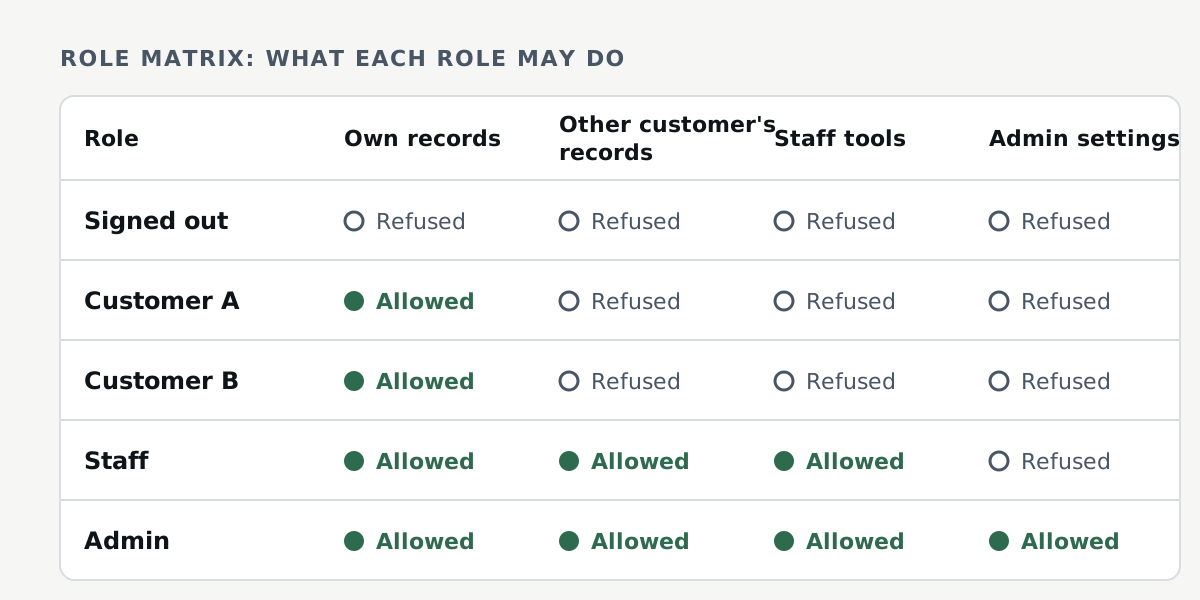
The OWASP Authorization Cheat Sheet describes the idea in design terms: list the kinds of users, the resources they can reach and the operations on them, then decide what each combination allows. Then write tests that prove it. I do the same thing as a table before any testing starts.
- Rows are roles. Include the ones people forget: a signed-out visitor, a user who was invited but hasn't accepted, a user who was just demoted, and a deactivated account.
- Columns are records and actions. View, create, edit, delete, export and invite are a good start, split by whose record it is.
- Each cell gets one short answer. Allowed, own only, or refused. If nobody can say which, that's your first finding.
Hypothetical example: a booking app with customers, staff and an admin. The diagram above is that matrix. Two customer rows are there on purpose, because the cheat sheet calls horizontal privilege escalation, reaching another user's resources, an especially common weakness.

You can see a full matrix in the launch-readiness sample report on our site. It's an app we built for the demonstration with invented data, and each row lists the checks that cover it, plus one gap we wrote down.
What should you test for each role?
The OWASP testing guide for authorization gives the core questions. For every role and every function, can someone reach it while signed out, after signing out, or while signed in with a role that shouldn't have it? From there I work through this list for each row of the matrix:
- Signed out. Open each page and call each API route with no session at all.
- After sign-out. Reuse the old session or token. OWASP says stateful session identifiers should be invalidated on the server after logout, and stateless JWT tokens should be short-lived.
- Same role, different user. Sign in as two customers and swap record IDs wherever they appear: the URL, the request body, and links to files and exports. The guide calls this the horizontal test, with two sessions kept active at once.
- Lower role, higher function. Call staff and admin routes directly from a customer session. That's the vertical test.
- Writes, not just reads. OWASP lists APIs with missing access controls for POST, PUT and DELETE as a common failure, so try every change as well as every view.
- Edge accounts. The invited, deactivated and newly demoted users from the matrix. Keep the old session open, change the role, then try again. I'd want the change to apply on the next request. If it waits for a token to expire, write down how long.
Why isn't hiding a button enough?
Because the button isn't the permission. The OWASP testing guide puts it plainly: "Sometimes, developers perform authorization validation at the GUI level only, and leave the functions without authorization validation", which can leave a hole. A customer who can't see the admin menu may still be able to call the admin API.
So the real test sends the request without the screen. The OWASP Top 10 entry says access control is only effective in trusted server-side code or serverless APIs, and that developers and QA staff should include functional access control in their unit and integration tests. I'd keep those tests after launch too. They won't catch everything, but they'll catch a later change that breaks a check you already wrote.
This isn't a penetration test, and I don't think it should pretend to be one. OWASP's cheat sheet says automated unit and integration tests of access control are good at catching the "low-hanging fruit" but not more sophisticated attacks, and they aren't a substitute for a dedicated security test or penetration test. I'd say the same about a manual role pass like this one.
How do you cover desktop and phone without doubling the work?
You don't need every check at every width. If the phone and the desktop use the same server routes, the permission checks only need one pass. If the phone has its own app or its own API, it gets its own pass. What changes on a phone is the layout and the journey, so I repeat the main journeys for each role at a phone width and look for what breaks.
Two accessibility rules make good pass marks. WCAG 2.2 Reflow expects content to work at a width equivalent to 320 CSS pixels without scrolling in two directions, with exceptions for things like data tables and maps, and Target Size (Minimum) asks for pointer targets of at least 24 by 24 CSS pixels, with some exceptions.
Emulation is fine for breadth, but it isn't a phone. Chrome's documentation calls device mode "a first-order approximation" and says, "When in doubt, your best bet is to actually run your page on a mobile device." In our sample report we ran the browser tests by role at 1440 and 390 pixels wide in Chromium, and we wrote down that Safari, Firefox and real phones weren't tested. I think saying what wasn't covered matters as much as the results.
What should the findings look like before launch?
Each finding should name the role, the device or width, the steps to reproduce, what you expected and what happened, and a severity. A role that can see or change data it shouldn't is the top of the scale. In the sample report's rubric that's Critical and should be fixed before release.
Then retest every fix against the original finding, and keep a list of what's still open on launch day. The launch decision stays with you, but it should be made with that list in front of you. If you'd like an outside pass on this, that's what our launch-readiness review does.
Tell us what you're launching or fixing. Thomas will reply by email with a plain next step.
Request a consultationFrequently asked questions
Is testing every user role the same as a penetration test?
No. Role testing checks that each role can do what it should, and that the things it shouldn't do get refused. The OWASP Authorization Cheat Sheet says automated access control tests aren't a substitute for a dedicated security test or penetration test. I treat a role pass the same way: it's one layer, not the whole job.
How many test accounts does each role need?
Two is the useful minimum, so you can check that one user can't reach another user's records with the same role. That's the setup the OWASP testing guide describes for horizontal checks.
Is a browser's phone emulation enough?
It's a good start for layout, but Chrome's own documentation calls device mode a first-order approximation and suggests running the page on a real mobile device when in doubt.
What should a pre-launch finding include?
The role and device, the steps to reproduce, what you expected and what happened, and a severity. The sample report on our site shows findings with steps, expected and actual results, a severity and a retest of every fix. It's a demonstration on an app we built, and it says which defects we planted on purpose.
How this article was prepared
Research, drafting, source re-checking and technical testing for this article were done with AI agents (Claude) under my direction. It's general information, not legal, tax or accounting advice.
Prepared with AI assistance and checked by automated review. Thomas hasn't reviewed this version yet, and it hasn't been reviewed by a lawyer or CPA.
Sources and how this was researched
This article was researched on November 2, 2026 and its sources were re-opened on November 3, 2026, from the OWASP Top 10:2025 entry on broken access control, the OWASP Web Security Testing Guide, the OWASP Authorization Cheat Sheet, two W3C Understanding documents for WCAG 2.2 and Chrome's DevTools documentation, each opened that day. Examples of the method come from Wagenberg Technology Group's own sample report, which tests an application built for the demonstration with invented data; it is not client work. No statistics were added beyond what the sources state.
- A01:2025 Broken Access Control. OWASP Top 10:2025. Accessed .
- Testing for Bypassing Authorization Schema (WSTG-ATHZ-02). OWASP Web Security Testing Guide. Accessed .
- Authorization Cheat Sheet. OWASP Cheat Sheet Series. Accessed .
- Understanding Success Criterion 1.4.10: Reflow. W3C Web Accessibility Initiative. Accessed .
- Understanding Success Criterion 2.5.8: Target Size (Minimum). W3C Web Accessibility Initiative. Accessed .
- Simulate mobile devices with device mode. Chrome for Developers. Accessed .
- A launch-readiness review: sample findings and retests. Wagenberg Technology Group LLC. Accessed .