
Calendar and scheduling 13 min read
How to test time zones and daylight saving time in a scheduling app
Test the days the clocks change, not ordinary days. Book, repeat and remind across the missing spring hour and the repeated autumn hour in several zones, keep future bookings as local time plus a zone ID, and check that your time zone data is current, because the IANA Time Zone Database changes when governments change their rules.

Founder, Wagenberg Technology Group
Research and drafting: AI agents (Claude) working under Thomas Wagenberg's direction. Verification: AI agents and automated checks.
Key takeaways
- The bugs live on a few days a year. In most of the United States the clocks changed on two Sundays in 2026, March 8 and November 1, so tests that only use today's date will miss them.
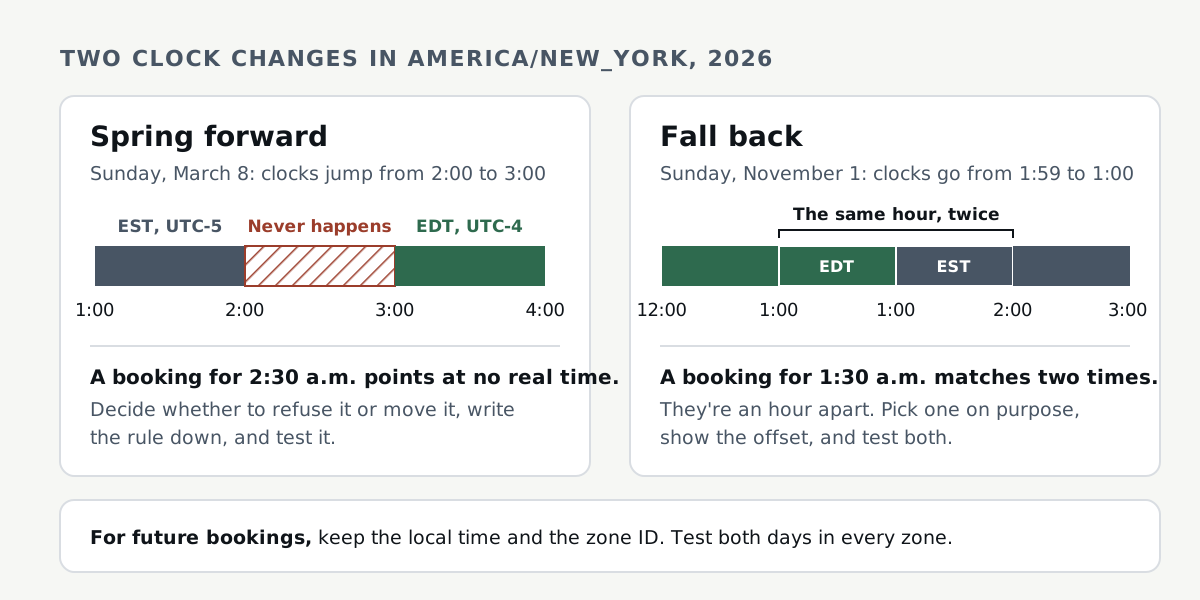
- A wall time isn't always one moment. On the spring change one local hour never happens, and on the autumn change one hour happens twice. Temporal's documentation shows why your code has to pick a rule for both.
- Future bookings need the zone, not just an offset. The W3C draft note on time zones says calendars need the time zone to compute future times, because summer time rules decide the wall time.
- Time zone data goes stale. Cuba's rules changed days before a clock change, and the tz 2026f release followed. Test against the data your servers and phones actually have.
Why do time zone bugs survive testing until launch?
Because most tests run on ordinary days. A booking made today for next Tuesday at 10 a.m. works almost everywhere, almost all year. The trouble sits on a few dates. In the United States, NIST's daylight saving page says that during 2026 daylight saving time ran from March 8 at 2 a.m. to November 1 at 2 a.m., local time. Unless someone picks those dates on purpose, the test suite never touches them.
The bugs also look like user error at first. The W3C draft note on time zones lists a familiar case. Two people set up a recurring call, and sometimes the reminder comes too early or too late. Sometimes the app won't let them in because the call is "already over". I think that's what a time zone bug usually looks like from the outside. Usually nobody gets an error message. Somebody just shows up at the wrong time.
So I'd treat time zones and daylight saving as their own test plan, written before launch, with specific dates and zones in it.
What actually breaks around a daylight saving change?
Two things happen to the clock, and each one breaks different code.
- A local time that never happens. On the spring change the clock skips an hour. NIST describes it plainly: at 2 a.m. the local time skips ahead to 3 a.m., so the day has one less hour. The W3C note calls a time like that a "ghost time". A booking form that offers 2:30 a.m. that Sunday is offering a slot that doesn't exist.
- A local time that happens twice. On the autumn change, NIST says "at 2 a.m. the local time becomes 1 a.m. and that hour is repeated". So 1:30 a.m. on that Sunday names two moments, an hour apart.
- A day that isn't twenty-four hours. Code that adds a fixed number of milliseconds for "one day" can land an hour off across a change, or half an hour on Lord Howe Island. The W3C note warns about exactly this, because a day can have more or fewer seconds when the clocks change.
Every library needs a rule for these times, and that's the part I'd check first. Temporal's documentation lists four choices for a wall time near a change: "compatible", "earlier", "later" and "reject", where reject throws an error. Its default matches legacy JavaScript Date, moment.js, Luxon, date-fns and RFC 5545. Python's zoneinfo uses the fold attribute from PEP 495: for a repeated time, fold 0 means the offset before the transition and fold 1 the offset after. When we tried both New York change days in Python, fold 0 gave the same answers as Temporal's default.
None of these defaults is wrong, but they don't all agree. PostgreSQL's documentation says it reads a repeated time with the offset from after the change, so it picks the second 1:30 a.m., the opposite of Temporal's default. I think the bug is when nobody chose a rule on purpose. If the booking form rejects the time, the API takes a default and the reminder job does its own offset math, the same repeated time can end up meaning different moments in each.
How should a booking app store future appointments?
The quick answer you'll hear is to store everything in UTC. For things that already happened, that's good advice. The W3C note says "When in doubt, use UTC for serializing, storing, and exchanging date and time values." But for a calendar or meeting schedule, the same note says "you will need the time zone (and not merely the local time offset) to ensure proper time computation."
The note's own recommendation for future events is an instant tagged with the zone ID. I'd go one step further, because a future booking is a promise about the wall clock. If someone books nine in the morning in Chicago next June, they mean nine on the clock in Chicago, whatever the rules are by then. So I'd keep three things for each future booking:
- the local date and time the person picked;
- the IANA zone ID, such as
America/Chicago, not an abbreviation or a bare offset; - a computed UTC instant for sorting, queries and reminders, recomputed when the zone rules change.
That last point is easy to miss. The W3C note says systems that store an exact time for scheduling or notifications may need to check or update those records when a zone's rules change. Temporal's documentation walks through a real case: Brazil stopped observing daylight saving time in 2019, so future times saved in 2018 with the old offset no longer matched the new rules.
Hypothetical example: a booking app stores only the UTC instant for a class at nine in the morning, local time, next year. The country changes its rules, the tz data updates, and the class still fires at the old UTC instant, which is now an hour early or an hour late on the wall clock. Everyone who trusted the confirmation email arrives at the wrong time.
Why does the time zone database matter for testing?
Because the rules are data, and data goes stale. The IANA Time Zone Database says it's updated when political bodies change boundaries, UTC offsets or daylight saving rules. It also says end users usually get those updates from their software and operating system vendors.
This year gave a clean example. The comment in the tz northamerica file records that on October 24, 2026, the Cuban authorities announced daylight saving time would stay in effect until November 7, 2027, suspending the return to standard time scheduled for November 1, 2026. The 2026f release notes summarize it as "Cuba will not fall back 2026-11-01; stays on -04 through 2027-11-07." That's about a week between the announcement and the clock change.
When we checked a Mac during the research for this article on November 4, 2026, it had a 2026f update on disk since October 30 but was still using version 2026e. Python's zoneinfo, which reads system data first according to its documentation, still had Havana falling back to UTC-05:00 on November 1, and so did the system date command. The same documentation recommends depending on the tzdata package for cross-platform projects, because some systems, notably Windows, don't ship an IANA database.
So a test plan should ask where each part of your product gets its rules: the database server, the app server, the reminder worker, the browser and the phone. They can disagree. I'd add a check that prints the tz data version on each server and worker and fails if it's older than the release you expect. You don't control the data on your users' browsers and phones, so there I'd test a zone that changed recently, like America/Havana, and see what the screen shows.
Which dates and time zones should be in your test plan?
You don't need every zone. You need zones that break different assumptions. This is the set I'd start with, using each source's rule to work out the dates:
America/New_York, the US rule. NIST gives March 8 and November 1 for 2026. By the rule in 15 U.S.C. 260a, second Sunday of March and first Sunday of November, 2027 is March 14 and November 7.Europe/Berlin, the EU rule. Directive 2000/84/EC starts summer time at 1.00 a.m. GMT on the last Sunday in March and ends it on the last Sunday in October. That's March 29 and October 25 in 2026, and March 28 and October 31 in 2027.Australia/Sydney, the southern hemisphere, where summer time runs across the new year. The tz australasia file ends it on the first Sunday in April and starts it on the first Sunday in October, so April 4 and October 3 in 2027.Australia/Lord_Howe, a zone whose daylight saving shift is 30 minutes, not an hour, in the same file. Anything that assumes a change is always one hour shows up here.Asia/KolkataandAsia/Kathmandu, offsets of 5:30 and 5:45 with no daylight saving, per the tz asia file. Slot grids built on whole hours, and offset math done in hours, break here.America/Phoenix, a zone with no daylight saving. The tz theory page uses it as the example next toAmerica/Denver, which does observe it. Two users at the same offset in winter are an hour apart in summer.America/Havana, a zone whose rules changed days before a clock change. Use it to test that your data updates actually reach production.UTC, as the control. If a test fails in UTC too, I'd look for a plain logic bug before blaming daylight saving.
The weeks between the US and EU changes deserve their own tests. From March 8 through March 28, 2026, New York had moved to UTC-4 under the US rule (see the tz northamerica file) while Berlin stayed on UTC+1 until the EU change. So a weekly call set at 9 a.m. in New York landed at 2 p.m. in Berlin for three weeks, instead of 3 p.m. The same thing happened for one week in autumn, between Berlin's change on October 25 and New York's on November 1. If your app shows the other person's local time, that's a good place to check it.

What should you test in each part of the product?
For each zone above, I'd run the same flows on the change days, the day before and the day after.
- Booking. Offer slots inside the missing hour and the repeated hour. The product should refuse, move or ask, and the confirmation should show the offset or zone so the person can tell which of the two times they got.
- Recurring events. Create a weekly event before a change and look at the instances after it. Add one that repeats at 2:30 a.m. too, because RFC 5545 says a repeat that lands on a time that doesn't exist is skipped, not moved. I'd check what your code and each calendar app actually do with it. The RFC's own example shows a daily 9:00 AM New York event staying at 9:00 AM local across the October change, EDT before and EST after. The W3C note says to compute each instance with the time zone rather than assume a fixed number of hours between events.
- Calendar invites and ICS files. Check that every timed meeting
DTSTARTcarries aTZIDor a UTC time ending in Z, because a bare local time is "floating" in RFC 5545 and follows the attendee's zone. All-day events are the exception, since they use a plain date. Then check that the file has aVTIMEZONEfor eachTZID. RFC 5545 says it must, and it warns: "Failure to include and follow VTIMEZONE definitions in iCalendar objects may lead to inconsistent understanding of the local time at any given location." Then import the file into the calendar apps your users actually use. - Server versus browser. In JavaScript, MDN says the default time zone for formatting is the runtime's own. A server running in UTC and a browser in Chicago will format the same instant differently unless you pass the zone. The W3C note says values that arrive with no zone should generally be treated as UTC, so look for timestamps that lose their zone between the API and the screen.
- Reminders and background jobs. Schedule a reminder for an event right after a change, and one for an event inside the repeated hour. Check that each fires once, at the right moment, and not twice or never.
- People who travel. Set the profile zone to New York and the device to Berlin. The W3C note suggests letting users choose a time zone and keeping it with their profile. RFC 5545 also has "floating" times, which follow whatever zone the attendee is in. That's right for a personal daily routine and wrong for a meeting between two cities, so check which one each feature means.
How do you run these tests without waiting for the real date?
Freeze the clock and set the zone explicitly. I'd use whatever your test framework offers for faking the current time. The tz theory page describes the POSIX TZ environment variable, which takes a geographical value like Europe/Berlin, and notes that it's process-global, so I'd set it before the test process starts. I'd run the scheduling tests once per zone in the list above, with the frozen clock set to the day before each change.
Write the expected results by hand from the rules, not by calling the same library the app uses. If the test computes its answer with the code under test, it can agree with the bug. A short table of zone, local time, expected UTC instant and expected offset is enough, and it doubles as documentation of the rule you chose for the missing and repeated hours. Here are rows I'd start from. We worked them out from the rules and cross-checked them with Python's zoneinfo:
- New York, 2026-03-08 02:30. That time doesn't exist. Read the way RFC 5545 reads it, it becomes 03:30 EDT, which is 07:30Z.
- New York, 2026-11-01 01:30. Two answers, 05:30Z in EDT and 06:30Z in EST, an hour apart under the US rule. Your test should say which one the app picks.
- Berlin, 2026-03-29 02:30. That time doesn't exist either, because summer time starts at 1.00 a.m. GMT under Directive 2000/84/EC. Read like RFC 5545, it becomes 03:30 CEST, which is 01:30Z.
- Lord Howe, 2027-04-04 01:45. It happens twice, only 30 minutes apart, at 14:45Z and 15:15Z the day before in UTC, because the tz australasia file gives Lord Howe a half-hour shift.
- Kathmandu, any day at 09:00. That's 03:15Z, from the 5:45 offset in the tz asia file. A slot grid built on whole hours will get it wrong.
Then do one manual pass in the real calendar apps your users have, because import behavior is outside your code. I don't think automated tests replace that pass. They keep the rules from slipping after launch.
When is it worth having someone else check it?
If your product books time, I think the clock-change days deserve a written test plan before launch, whoever runs it. The plan above is a fair start for most small teams.
If you'd like an outside pass, that's what our calendar and scheduling audit covers: availability against connected calendars, time zones and daylight saving changes, two people booking the same slot, reschedules and cancellations, and calendar sync. You get a written assessment first, then fixes with automated tests for the findings you assign to us. If scheduling is one part of a bigger launch, the launch-readiness review checks it by user role on desktop and phone. I lead and sign off the work, the engineering is AI-assisted under my direction, and every fix reaches your repository as a pull request your team reviews.
Tell us what you're launching or fixing. Thomas will reply by email with a plain next step.
Request a consultationFrequently asked questions
Should a booking app store appointments in UTC?
For moments that already happened, UTC is fine, and the W3C note says to use UTC when in doubt. For future bookings it says calendars need the time zone, not only the offset, and it recommends an instant tagged with the zone. I'd keep the local time and the IANA zone ID as well, and treat any stored UTC copy as something you recompute when the rules change.
What happens to a booking inside the hour the spring change skips?
That time doesn't exist in zones that skip that hour. RFC 5545 reads it with the offset from before the gap, so 2:30 a.m. becomes 3:30 a.m. daylight time. Temporal lets your code choose earlier, later or reject. Pick one, tell the user, and test it. Repeating events are different: RFC 5545 says an instance that lands on a time that doesn't exist is skipped.
Which time zones should be in the test plan if all my users are in one country?
At least your own zone and UTC, plus one zone where your users travel. In the United States, add a zone without daylight saving, because NIST lists Hawaii and most of Arizona as places that don't observe it.
How often does the time zone database change?
There's no fixed schedule. The W3C note says updates can happen at any time, and Temporal's documentation says the database is updated several times per year. The 2026f release, dated October 27, 2026, updated the data after Cuba called off the clock change it had scheduled for November 1.
How this article was prepared
Research, drafting, source re-checking and technical testing for this article were done with AI agents (Claude) under my direction. It's general information, not legal, tax or accounting advice.
Prepared with AI assistance and checked by automated review. Thomas hasn't reviewed this version yet, and it hasn't been reviewed by a lawyer or CPA.
Sources and how this was researched
This article was researched on November 4, 2026. Every source was opened that day: the NIST daylight saving time page, the US Code section on changeover dates, the EU summer-time directive, the IANA Time Zone Database pages and source files, RFC 5545, the TC39 Temporal documentation, the Python zoneinfo documentation, the W3C note on time zones, the PostgreSQL documentation and MDN. Quotes were checked word for word against the saved page text. The 2027 dates and the US and EU gap weeks were worked out from the rules in those sources and cross-checked with Python's zoneinfo. The note about stale data on a Mac comes from a check run in the research for this article on the same day (active system tz data version 2026e, with a 2026f update on disk but not in use), not from client work. No statistics were added beyond what the sources state.
- Daylight Saving Time Rules. National Institute of Standards and Technology (NIST). Accessed .
- 15 U.S. Code 260a: Advancement of time or changeover dates. Legal Information Institute, Cornell Law School. Accessed .
- Directive 2000/84/EC of the European Parliament and of the Council of 19 January 2001 on summer-time arrangements. EUR-Lex, Publications Office of the European Union. Accessed .
- Time Zones (Time Zone Database overview). Internet Assigned Numbers Authority (IANA). Accessed .
- Time Zone Database Release 2026f. Internet Assigned Numbers Authority (IANA). Accessed .
- tzdb source file northamerica. IANA Time Zone Database. Accessed .
- tzdb source file australasia. IANA Time Zone Database. Accessed .
- tzdb source file asia. IANA Time Zone Database. Accessed .
- Theory and pragmatics of the tz code and data. IANA Time Zone Database. Accessed .
- RFC 5545: Internet Calendaring and Scheduling Core Object Specification (iCalendar). IETF, RFC Editor. Accessed .
- Time Zones and Resolving Ambiguity (Temporal documentation). TC39 (Ecma International), Temporal proposal. Accessed .
- zoneinfo: IANA time zone support. Python Software Foundation (Python documentation). Accessed .
- Working with Time and Timezones. W3C Internationalization Working Group (Group Draft Note, 26 July 2025). Accessed .
- B.2. Handling of Invalid or Ambiguous Timestamps. PostgreSQL Documentation (PostgreSQL Global Development Group). Accessed .
- Intl.DateTimeFormat.prototype.resolvedOptions(). MDN Web Docs (Mozilla). Accessed .