
Launch readiness 8 min read
Login, sign-up and password reset test cases to run before launch
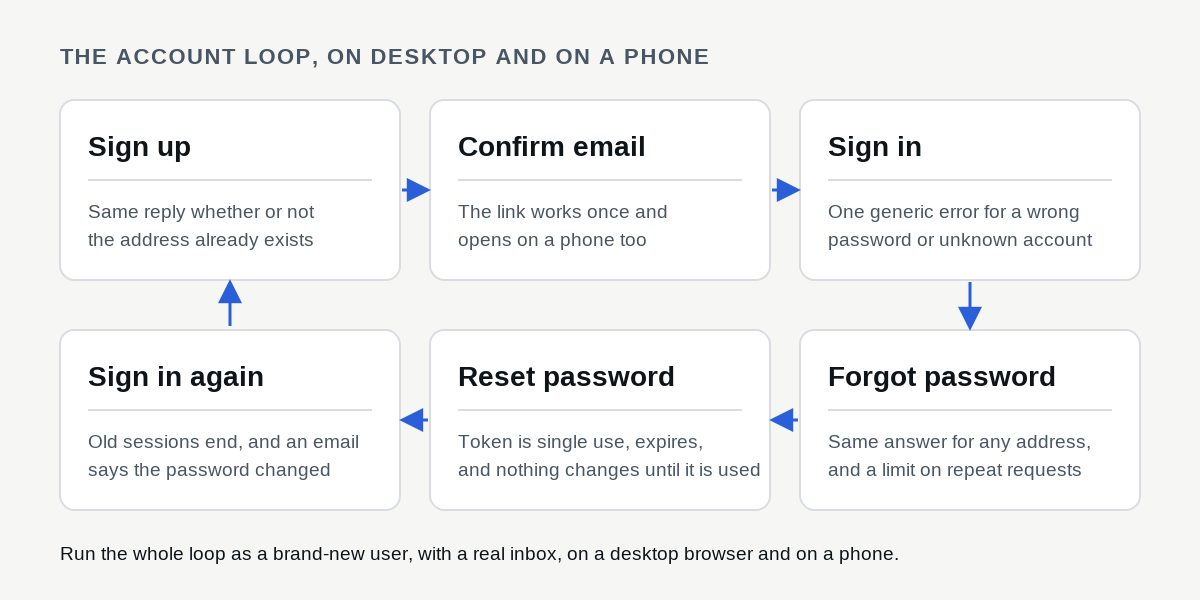
Run the account loop as a new user with a real inbox: sign up, confirm the email, sign in, ask for a reset, reset, and sign in again, on desktop and on a phone. Check what each message gives away, that links work once, and whether old sessions end after a reset, which the OWASP Forgot Password Cheat Sheet covers.

Founder, Wagenberg Technology Group
Research and drafting: AI agents (Claude) working under Thomas Wagenberg's direction. Verification: AI agents and automated checks.
Key takeaways
- Test the loop, not the screens. Sign-up, sign-in and reset share accounts, emails and sessions, so we run them in order as one new user. The OWASP testing guide runs the same checks on password change and reset, such as whether one user can reset another user's password.
- Read every message as a stranger would. The OWASP Authentication Cheat Sheet asks for the same generic reply whether the account exists or not, on login, reset and, where you can, sign-up.
- A reset should end the old sessions. The Forgot Password Cheat Sheet says to invalidate existing sessions after a reset, or ask the user whether to, and to email the user that the password changed.
- Don't fight password managers. Blocking paste or autofill on a login form can fail WCAG 2.2 Accessible Authentication, and NIST SP 800-63B tells verifiers to allow password managers.
Why test the account flows as one loop?
It's common to write test cases for the login page and the forgot-password form separately. But sign-up, sign-in and password reset share one account, one inbox and one set of sessions. A bug in one often shows up in another. A reset that works on its own can still leave an old session signed in, and a sign-up form can tell a stranger which emails already have accounts.
So we run them in order, as one brand-new user, the way a real person meets them. I think that's the cheapest way to find the problems that only appear between steps. The OWASP testing guide runs the same checks on password change and reset, starting with whether one user can change or reset another user's password.
Hypothetical example: a small booking app is about to launch. Customers sign up with an email, confirm it, book, and come back a week later having forgotten the password. That's the loop in the diagram, and the rest of this article walks through it.

What should you check when someone signs up?
Start with a fresh email address you can actually read, on a phone as well as a desktop. Then sign up and look at three things.
- The confirmation email arrives and the link works once. Open it on the phone, then try the same link again. It should either do nothing new or tell you it's already been used.
- The reply doesn't reveal who has an account. Sign up again with the same address. The Authentication Cheat Sheet suggests a generic reply here too, such as saying a link has been emailed to the address provided, rather than "This user ID is already in use."
- The form works with a password manager. Google's sign-in form guidance recommends
autocomplete="new-password"on the sign-up password field, so the browser offers to generate and save one. Check that it does.
If the form sets password rules, compare them with NIST SP 800-63B: at least 15 characters when the password is the only factor, room for at least 64 (NIST says should here), no rules that force a mix of character types, and a check against a list of common or breached passwords that tells the user why one was refused. NIST writes for US government systems, so unless a contract or a customer asks for it, it's a reference rather than a rule. But I think it's the clearest reference there is, and it's worth knowing when your rules differ from it.
What should a failed login tell the user?
As little as possible. The OWASP Authentication Cheat Sheet says login, reset and recovery must answer with a generic error whether the password was wrong, the account doesn't exist, or the account is locked. Its example of a good login message is "Login failed; Invalid user ID or password."
The screen isn't the only place a difference can show. The OWASP enumeration test compares the server's answers for a real user with a wrong password and for a user that doesn't exist, including the status code and the length of the response. The cheat sheet adds that a different response time can give it away too. So we try both cases and compare what comes back, not just what's shown.
Then check what happens after several wrong passwords. The cheat sheet suggests counting failures per account rather than per IP address, and warns that a lockout can be used to lock other people out. Whatever your rule is, I'd want it written down and seen working before launch.
How do you test the forgot-password and reset flow?
This is where most of the checks are. The OWASP Forgot Password Cheat Sheet gives the core of it, and we turn it into these steps:
- Ask for a reset for a real address and a made-up one. The answers should match, in words and in timing. The Authentication Cheat Sheet gives "If that email address is in our database, we will send you an email to reset your password." as a good reply.
- Ask several times in a row. There should be some limit, so nobody can flood a user's inbox with reset emails, which is the risk the Forgot Password Cheat Sheet describes.
- Check that nothing changes yet. Until the link is used, the old password should still work and the account shouldn't be locked, which the Forgot Password Cheat Sheet asks for. The OWASP testing guide explains why: the emailed token keeps the current password valid until the reset is confirmed.
- Use the link once, then again. The cheat sheet says tokens should be single use and expire, so the second try should fail. Let one link sit past its expiry and try that too.
- Look at the link itself. It should use HTTPS and point at your real domain. The cheat sheet warns against building reset URLs from the request's Host header.
- Finish the reset on the phone. The new password field should take a password manager's suggestion, which is what
autocomplete="new-password"is for in Google's guidance.
What should happen after the password changes?
Three things, and each one is easy to miss.
First, the user shouldn't be signed in automatically. The Forgot Password Cheat Sheet says to send them through the normal sign-in, because an automatic sign-in adds complexity to the session code and makes security holes more likely.
Second, the old sessions. Before the reset, sign in on a second browser or the phone and leave it open. After the reset, refresh it. The cheat sheet says to invalidate existing sessions or ask the user whether to. If the old session still works and nobody was asked, I'd treat that as a finding.
Third, the email. The user should get a message saying the password was changed, and it should never contain the password. That's also in the cheat sheet. I think it matters because it may be the only warning a real owner gets if someone else did the reset.
While you have two sessions open, check sign-out too. The Session Management Cheat Sheet says the session has to be ended on the server when the user logs out, and that the session ID must be renewed when someone signs in. So after signing out, refresh the old tab and try an action there. It should send you back to sign in. If the back button still shows account pages from the browser's cache, note that too, because it's a different problem from a live session.
Why test the login form on a phone and with a password manager?
Because that's how a lot of people will meet it, and it's where small choices lock people out. WCAG 2.2 success criterion 3.3.8 treats remembering a password as a cognitive function test. A username and password form can pass when the browser and password managers can fill it in. Blocking autofill or paste would fail it, unless there's another way to sign in that doesn't rely on memory. NIST SP 800-63B says verifiers shall allow password managers and autofill, and should permit paste.
So on the phone we check that the email field brings up the email keyboard, that the password manager offers to fill both fields, and that there's a Show password control and an obvious forgot-password link. Google's sign-in guidance recommends each of those, along with autocomplete="current-password" on the sign-in password field. We also check that paste works, which is the NIST and WCAG point above.
What should the findings look like before launch?
Each finding should name the step in the loop, the device, the steps to reproduce, what you expected and what happened, and a severity. An old session that survives a reset, or a message that confirms which emails have accounts, sits near the top of the list for me. A missing Show password control matters less, but I'd still count it as a finding.
Then retest each fix by running the whole loop again, not just the step that broke, because the steps share state. You can see the format we use in our launch-readiness sample report, which is a demonstration on an app we built with invented data, not client work. If you'd like an outside pass on your account flows before launch, our launch-readiness review can cover them.
Tell us what you're launching or fixing. Thomas will reply by email with a plain next step.
Request a consultationFrequently asked questions
Is testing the login and reset flow the same as a penetration test?
No. This is a functional check that the account flows do what they should and don't give things away. The OWASP testing guide has deeper tests, like trying to reset another user's password or forging the request, and I'd leave those to a security tester if the app holds anything sensitive.
Should the login error say whether the email or the password was wrong?
OWASP's guidance is no. The Authentication Cheat Sheet gives "Login failed; Invalid user ID or password." as the correct example. It also admits generic messages can confuse real users, and says the choice depends on how critical the app is. I'd make that call on purpose and write it down.
Should a user be signed in automatically after resetting a password?
The Forgot Password Cheat Sheet says not to. After the new password is set, the user should sign in the usual way, because an automatic sign-in adds complexity to the session code and makes security holes more likely. It also suggests ending the old sessions or asking the user whether to.
How long should a password be?
If you follow NIST SP 800-63B, at least 15 characters when the password is the only factor, and at least eight when it's used only alongside a second factor, with no rules about mixing character types. It's written for US government systems, so unless a contract or a customer asks for it, treat it as a strong reference rather than a rule.
How this article was prepared
Research, drafting, source re-checking and technical testing for this article were done with AI agents (Claude) under my direction. It's general information, not legal, tax or accounting advice.
Prepared with AI assistance and checked by automated review. Thomas hasn't reviewed this version yet, and it hasn't been reviewed by a lawyer or CPA.
Sources and how this was researched
This article was researched on November 5, 2026 from the OWASP Cheat Sheet Series (Forgot Password, Authentication and Session Management), two OWASP Web Security Testing Guide entries, NIST SP 800-63B-4, the W3C Understanding document for WCAG 2.2 success criterion 3.3.8 and Google's web.dev guidance on sign-in forms, each opened that day, with quotations checked against the saved page text. The booking-app example is hypothetical. It describes a functional pre-launch check, not a penetration test, and it isn't legal or compliance advice. No statistics were added beyond what the sources state.
- Forgot Password Cheat Sheet. OWASP Cheat Sheet Series. Accessed .
- Authentication Cheat Sheet. OWASP Cheat Sheet Series. Accessed .
- Testing for Weak Password Change or Reset Functionalities (WSTG-ATHN-09). OWASP Web Security Testing Guide. Accessed .
- Testing for Account Enumeration and Guessable User Account (WSTG-IDNT-04). OWASP Web Security Testing Guide. Accessed .
- Session Management Cheat Sheet. OWASP Cheat Sheet Series. Accessed .
- NIST SP 800-63B-4: Digital Identity Guidelines, Authentication and Authenticator Management. National Institute of Standards and Technology. Accessed .
- Understanding Success Criterion 3.3.8: Accessible Authentication (Minimum). W3C Web Accessibility Initiative. Accessed .
- Sign-in form best practices. web.dev (Google). Accessed .